What you owe
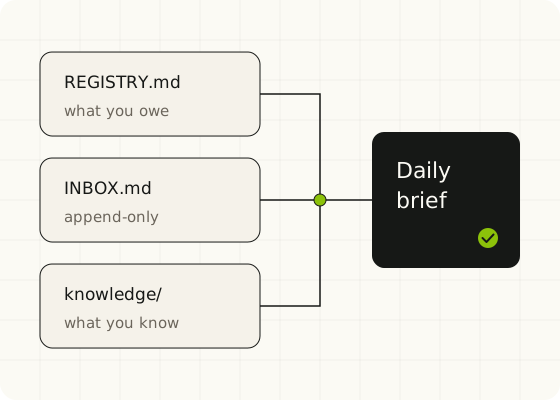
One list of commitments, each with its next action and dates. Your agent proposes changes; you accept them.
Free second brain
A second brain in plain Markdown files, run by your AI agent and approved by you. Your files stay on your computer, in a folder you own.
One list of commitments, each with its next action and dates. Your agent proposes changes; you accept them.
An inbox you add to in one line, at any time. It only grows until you review it.
Notes worth finding again, each marked by type, how actionable it is, and whether it is still true.
A daily brief and a board that recommend the next step, plus a weekly review.
No programming needed. You will type one sentence to your agent; it does the rest.
Get Python 3.11 or newer from python.org. On the first screen, tick "Add python.exe to PATH". Without it, nothing else works.
Use the one you already like: Codex, Claude Code, Cursor or Antigravity.
On GitHub, click Use this template, name it my-plainbrain, and choose Private. No GitHub account? Choose Code, then Download ZIP, and unzip it into a folder such as Documents\my-plainbrain.
In GitHub Desktop, choose File, then Clone repository, and pick my-plainbrain. Skip this if you downloaded the ZIP.
Open the folder in your agent app and start a conversation. The agent installs what it needs, creates your files and shows your first brief. Say yes when it asks to run a command.
A Review hooks window appears the first time. Choose Allow for "Checking the inbox rule". The other apps do not ask.
Prefer the terminal? The README has the commands.
Every day
| Say to your agent | What happens |
|---|---|
Capture: call the bank on Monday | Adds one line to your inbox |
Brief | Shows what to do today |
What do I know about pricing? | Answers from your own notes, with sources |
Weekly review | Goes through the inbox with you, one line at a time |
Optional: open the same folder in Obsidian to browse your notes. Nothing depends on it.
Your agent proposes changes to your list and writes them only after you accept.
Agents add lines and never rewrite the inbox. In Codex, Claude Code, Cursor and Antigravity, a hook can block direct edits to it.
Text inside a note or a saved web page is never an instruction to your agent, and no file holds a password.
Hooks stop ordinary edits rather than guarantee them, so keep your folder in a private GitHub copy or a synced drive.
Compatibility: tested on Windows with Codex, Claude Code and Cursor. Other operating systems and AI agents may work, but have not been tested.
Its sibling
Plainbrain covers what you know and what you owe. For agents that change code, records or customer data, use the free Human-Approved Agent Playbook.
Plainbrain is free to use on your own. If you would rather have help setting it up for a team, connecting it to your tools, or shaping it around how you already work, tell us what you use today.